Google Reviews for Restaurants: Get More Stars Legally
6 minutes
Reviews help many diners decide where to book. IAMenu reduces friction with a public review page and QR code while keeping both the Google review link and the private feedback option visible to everyone, regardless of the score selected.
What You Will Learn in This Section
- Activate reviews and connect your Google listing
- How the public review page works
- Print your review QR for tables and tickets
- Receive notifications via email and Telegram
- Multi-platform: TripAdvisor and Yelp (Pro+)
Step 1: Activate and Connect Google
In the side menu, go to Reviews:
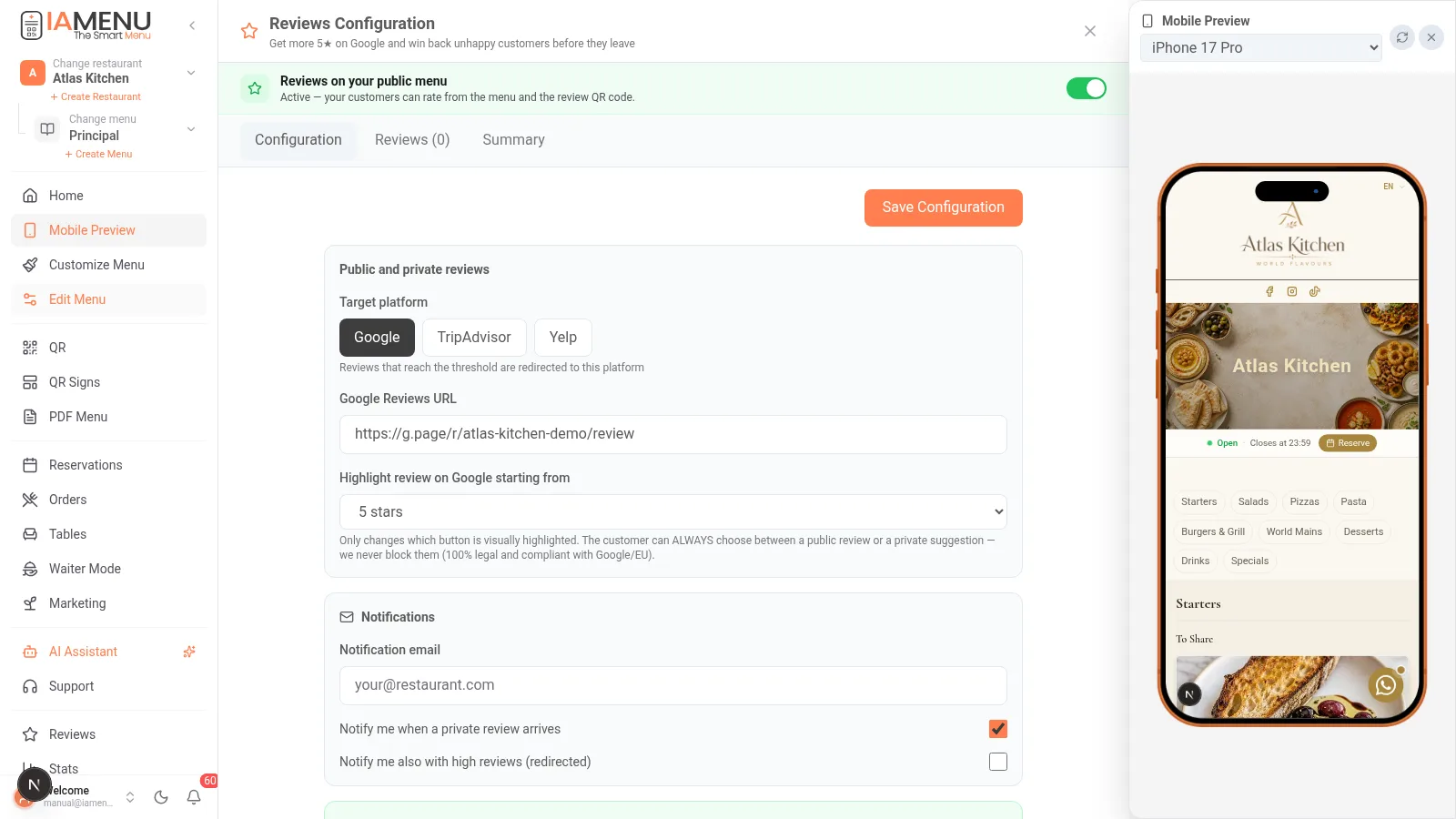
- Turn on the switch "Reviews on your public menu"
- Paste your Google reviews URL (the direct "write a review" link from your listing; IAMenu shows you where to find it)
- Choose from which rating you encourage emphasis to publish on Google (for example, 4-5 stars)
- Set up the notification email to be informed of each private suggestion
Available in all plans (basic capture in Starter; multi-platform and Telegram in Professional+).
Step 2: The Public Review Page
Your page lives at iamenu.ai/review/your-restaurant and is also accessible from the digital menu:
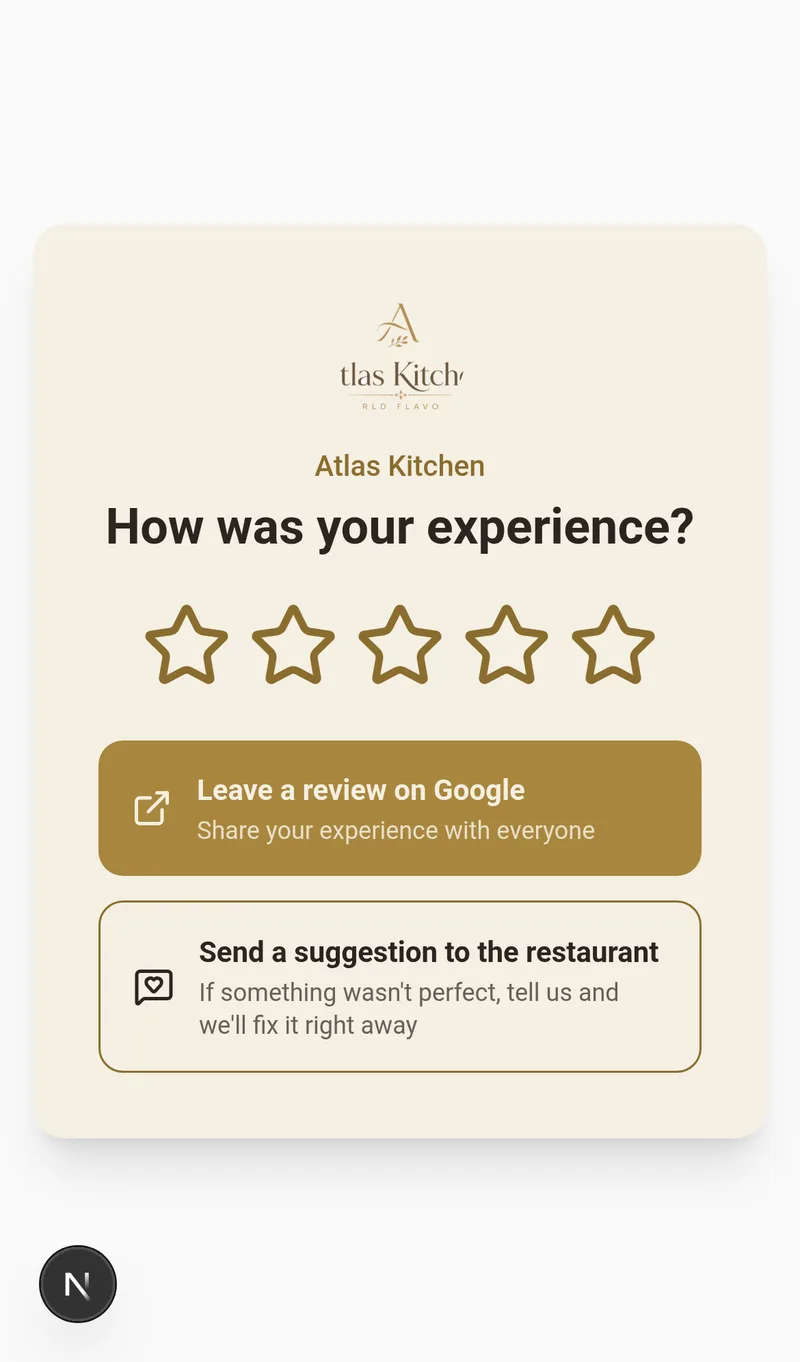
The diner rates with stars and sees always two paths:
- ⭐ "Leave a review on Google" — visible for ALL ratings
- 💬 "Send a suggestion to the restaurant" — private feedback that only you see
Why IAMenu Does Not Hide the Google Button
Restricting access to Google according to a prior rating can violate Google policies and applicable rules on deceptive practices. IAMenu does not block either path: the Google link and private feedback option remain visible to everyone, while the score only changes the visual emphasis.
Importante
Beware of tools that promise "only 5-star reviews": review gating can cost you your Google Business listing. With IAMenu, you can sleep easy.
Step 3: Your Printed Review QR
The golden moment to ask for the review is right after payment. Make it easy:
- Go to QR Posters and choose the purpose "Reviews"
- Choose a template: presets for Google and TripAdvisor, in light or dark, with stars
- The poster uses your logo and your brand style — or choose a unique style
- Download PDF and print: tables, bar, next to the POS, or on the ticket
The QR points to your review page forever: even if you change the settings, you never reprint.
Step 4: Get Instant Notifications
| Notification | Starter | Professional+ |
|---|---|---|
| Email when a private suggestion arrives | ✅ | ✅ |
| Notification also for high public reviews | ✅ | ✅ |
| Telegram instantly | — | ✅ |
Private suggestions remain in the Reviews tab of the panel with their rating, comment, and contact details if the diner provided them — respond and win back the customer.
Step 5: Multi-Platform (Pro+)
If you work in tourist markets, TripAdvisor is as important as Google:
- Set up Google + TripAdvisor + Yelp and choose the default platform
- The panel summary shows you the evolution of ratings and the public/private ratio
Best Practices That Work
- Ask for the review at the happy moment: QR on the ticket or when serving dessert, not days later
- Respond to all Google reviews, both good and bad: Google rewards it, and future customers read it
- Close the loop on private suggestions: respond to the suggestion and, once the problem is resolved, invite that person to return (a coupon from Marketing helps)
- Set a goal: 2-3 new reviews per week changes your position on Google Maps in a few months
Common Problem Solutions
My review page says "not available at this time"
The switch "Reviews on your public menu" is off. Turn it on in the Reviews panel.
I can’t find my Google reviews URL
In your Google Business profile: "Request reviews" or "Share your profile". The short link (g.page/r/...) is ideal. Paste it exactly as is in the settings.
Are private suggestions published anywhere?
No. You only see them in the panel. They are not public reviews; they are direct feedback for improvement.
Related Tutorials
- QR Code and Posters — the poster editor in detail
- Marketing — win back customers with coupons after a resolved complaint
- Customer View — where access to reviews appears in your menu
Turn Happy Diners into Google Stars
Create your account and review the current plans and terms.