Voice Dictation
Tell me and I'll write it down
Tell me: 'Add a margherita pizza for 12 euros with fresh basil'. I prepare the product, price and description for you to review.
— AI assistant for restaurants
Your AI assistant for drafting and managing restaurant menu changes by chat, voice or WhatsApp, with your team retaining final control.
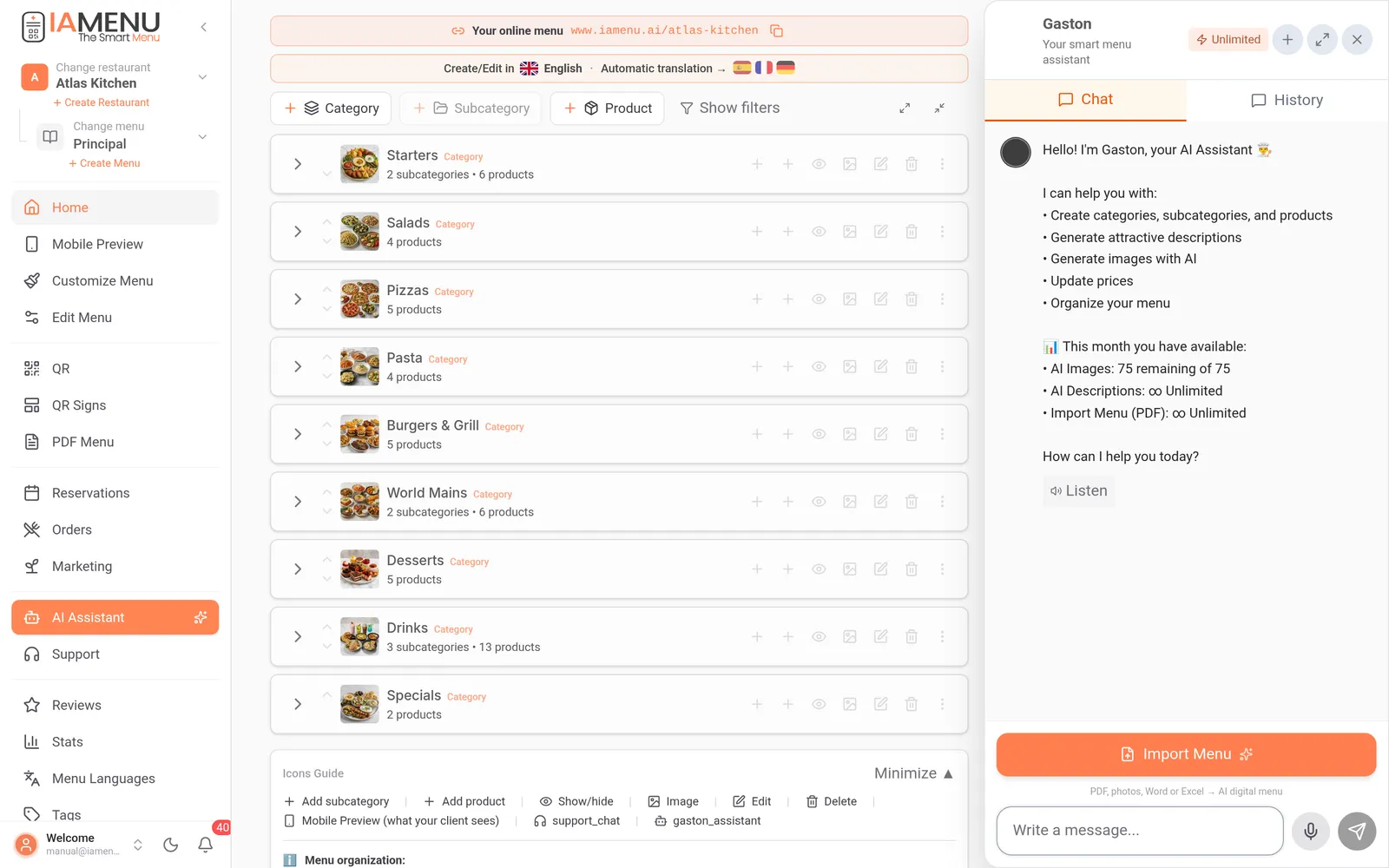
— 01 / The problem
Restaurant teams repeatedly update dishes, prices, availability, translations, images and regulated information. Doing each change field by field is slow and makes it harder to keep the published menu consistent.
The AI assistant provides one conversational entry point for authorised menu operations, in the dashboard chat or on WhatsApp. A request can prepare a focused change across the relevant records while preserving the menu structure and active-language settings.
You describe the outcome, review the proposed or completed change and decide what reaches customers.
— 02 / Capabilities
Tell me and I'll write it down
Tell me: 'Add a margherita pizza for 12 euros with fresh basil'. I prepare the product, price and description for you to review.
54-Language Catalog
I use culinary context to draft translations in the languages active on your plan. Review terminology before publishing it to guests.
Optional food imagery inside your workflow
Describe the dish and I can generate a visual option with GPT Image. Compare it with the food actually served before publishing, or use your own photograph when fidelity matters.
Reviewable allergen suggestions
I can suggest likely allergens: the 14 regulated in the EU and those other countries require, such as the US, UK or Japan. Your team must verify recipes, supplier information and cross-contact before publishing.
— 03 / How it works
Tell the assistant what you want: "Create a Desserts category with three products: Chocolate Cake for 8 euros, Tiramisu for 7, and Homemade Flan for 5". It understands natural language, no special commands needed.
The assistant prepares the category and products with their names, prices and positions, and can prepare translation drafts for the languages active on your plan.
Review prices, wording, translations, images and regulated information before publishing the approved change to the web menu.
— 04 / At a glance
From creating products to designing your promos and marketing posts
Natural-language requests from the dashboard, your phone or WhatsApp
Editable drafts for your menu’s active languages
AI suggestions that require operator verification
— 05 / Example workflows
""Add today's special: Sea Bass in Salt Crust for 22 euros." The assistant prepares the product and translation drafts; the team verifies the recipe and allergen information before publishing."
""Raise all products in the Wines category by 5%." The assistant identifies the affected products and applies the authorised bulk change so the team can check the resulting prices."
""Generate image options for the Pizza category." The assistant can send eligible products to GPT Image in batches; staff compare every result with the real dish before using it."
""Create a draft 2-for-1 cocktail promotion for Tuesdays and propose an Instagram post with my logo." The assistant prepares the promotion and branded asset for approval in the Marketing area."
— 06 / Comparison
— 07 / Bulk ops
Group related menu work into an authorised request, then review the affected records
Message: "Raise all drinks by 1 euro" — identify and update the affected products.
IAMenu AI assistant:
One authorised request
Manual work:
Open each product separately
Voice: "Draft a Pizzas category with 10 Italian classics" — prepare structured products for review.
IAMenu AI assistant:
One conversational workflow
Manual work:
Type every field separately
Request a translation draft in a supported language, subject to the plan's active-language limit.
IAMenu AI assistant:
Assisted translation workflow
Manual work:
Copy and manage separate documents
Upload an existing menu—a PDF or up to 16 photos—and ask the assistant to extract an editable category and product structure.
IAMenu AI assistant:
Editable draft for review
Manual work:
Copy and paste every item
Request image options for eligible products and review each result against the actual food.
IAMenu AI assistant:
Integrated batches within plan limits
Manual work:
Move between separate tools
Ask for likely allergens—EU and other countries—across selected products, then verify recipes, suppliers and cross-contact.
IAMenu AI assistant:
AI-assisted review
Manual work:
No initial suggestion layer
Copy a lunch-menu structure for dinner, then adjust products, availability and prices.
IAMenu AI assistant:
Structured duplication
Manual work:
Recreate the structure
Draft a seasonal category and products from a voice request, then edit the details before publishing.
IAMenu AI assistant:
One starting request
Manual work:
Start every product from a blank form
Prepare an authorised menu operation for selected restaurants in the group, respecting access and plan limits.
IAMenu AI assistant:
Centralised workflow
Manual work:
Repeat work by location
Hide affected products or update verified allergen information quickly when the kitchen reports a change.
IAMenu AI assistant:
Focused operational request
Manual work:
Find each affected record
— 08 / Questions
It understands natural language in whatever language you write in. You can say "create a Margherita pizza for 12 euros" or "translate the entire menu to French". No special commands or technical syntax required.
Yes, AI output can be incomplete or wrong. Review products, prices, translations, images and any consequential change before publishing. Allergen suggestions require verification against actual recipes, supplier information and cross-contact procedures.
Yes. In the dashboard chat you can dictate by voice from your phone or computer, and if your plan includes WhatsApp you can send it voice notes there. Ideal for chefs with busy hands; review the transcribed request before confirming changes.
Yes, depending on the plan. Link your number once and message it, send a voice note or a photo like any contact; it does the same as in the dashboard, with the same permissions and limits. Destructive actions ask for an explicit confirmation.
IAMenu translates the menu into more than 50 languages; how many you keep active depends on your plan. The assistant prepares culinary translation drafts in active languages, and staff review them before publishing.
The AI assistant is included in every paid plan and in the 14-day no-card trial, which unlocks every feature. The number of monthly messages depends on the plan; current limits are on the pricing page.
Yes. The assistant integrates GPT Image for individual or batch image generation within plan limits. Generated images can differ from the food served, so review each result or use your own photography when exact representation matters.
It serves your guests as an AI waiter: inside your digital menu—the one they open by scanning the table QR code—it answers their questions and recommends dishes from your menu data, depending on the plan. And it gives you the menu link and QR code, the reviews QR or one QR per table whenever you ask.
Your data is yours. The assistant uses the OpenAI API with encryption in transit. We do not share or store your data to train AI models. We comply with GDPR.
— Start now
Try me for free for 14 days. No credit card required.
Try the AI assistant with an editable menu and keep control of every published change.
Talk to your AI AssistantNo credit card required. Cancel anytime.