01
Before opening: keep your menu up to date
Change a price, remove a sold-out dish or prepare the daily special. The same QR code displays the menu you publish.
Solutions · Restaurants
A QR menu you can update, orders and bookings when you need them, and an easy way to collect feedback. All from IAMenu.
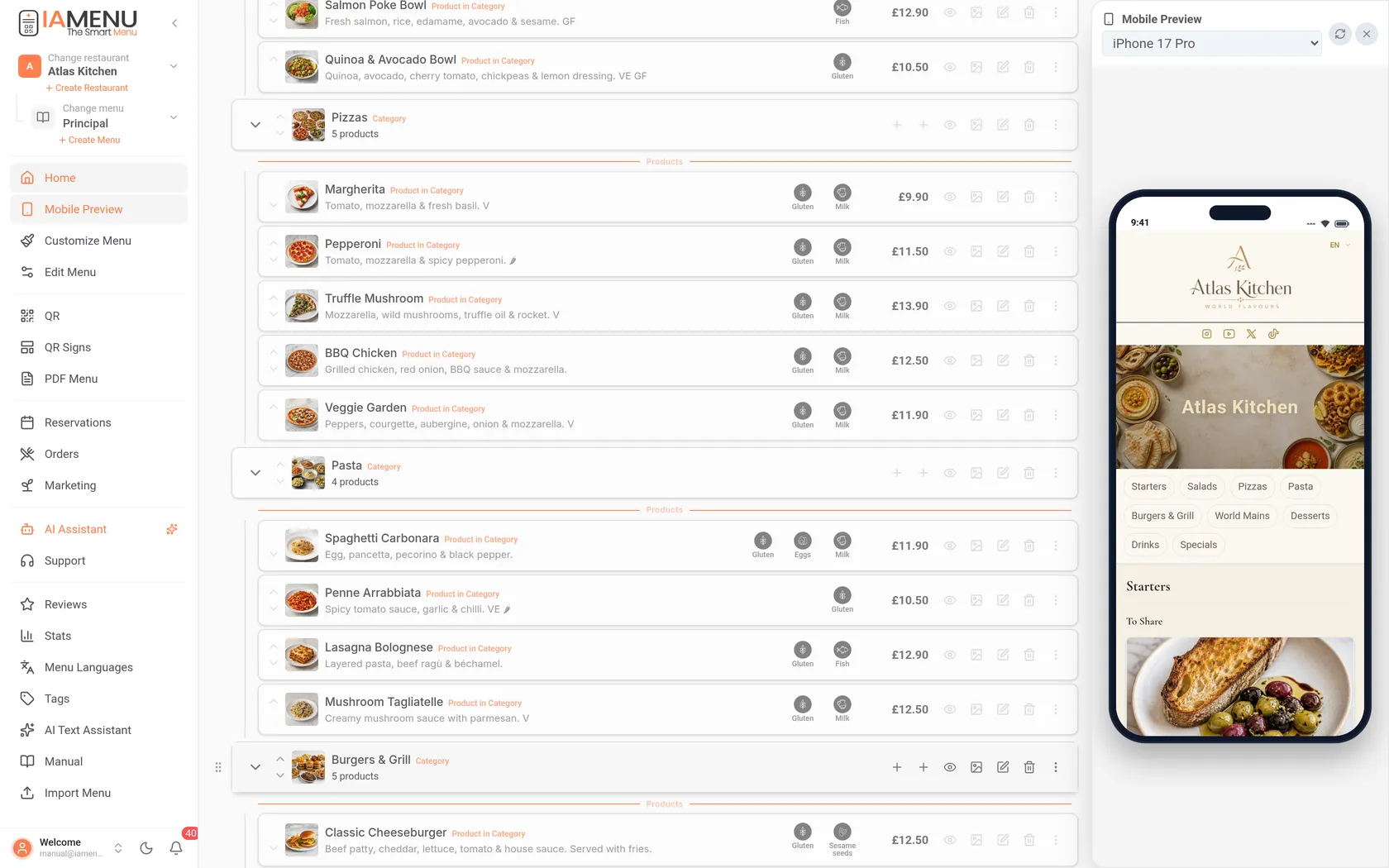
A day at your restaurant
Change a price, remove a sold-out dish or prepare the daily special. The same QR code displays the menu you publish.
Customers browse the menu on their phones. If you enable QR ordering or the order-taking system, your team can also manage orders in IAMenu.
Share your reviews QR code and read the feedback you receive. Keep the conversation going after their visit.
Getting started
Import or add dishes, check prices and languages, then publish.
Enable orders and bookings if you need them and they’re included in your plan.
Place the QR code on the tables and see what your customers see.
Each feature has its own explanation. Start with the one that suits your restaurant.
No. They scan the QR code and open your published menu in their mobile browser.
Yes. You can publish your menu first. Orders and bookings can be enabled and configured if they’re available on your plan.
Edit its details or availability in the dashboard. Your published menu updates, and the QR link stays the same.
Publish it and add other features when you need them. You can check the limits in the IAMenu plans.
Solutions · Restaurants